
Paradise UART Dongle
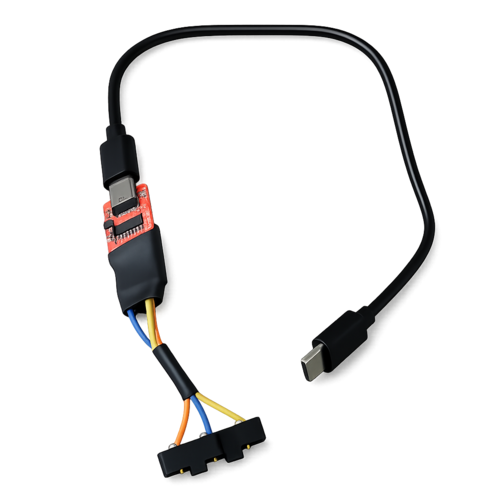
Hand-built connector with pogo-pin adapter
About
A USB-to-UART adapter that connects to the three contact pads inside your Tamagotchi Paradise's top compartment — the same pads that Tama Decker machines use to download exclusive content.
Once paired with the TamaHome Toolkit app, you can send custom items, trigger Lab Tama playdates, and create content just like the official kiosks.
What's Included
- Hand-built UART dongle with pogo-pin adapter
- Full TamaHome Toolkit App license
- Optional: USB-C cable (+$1)
How It Works
The dongle uses spring-loaded pogo pins in a custom 3D printed adapter that clips onto your Paradise. The pogo pins make reliable contact with the device's communication pads without scratching or damaging them.
- SparkFun CH340C USB-to-UART board (native 3.3V)
- 3D printed SLS Nylon adapter for secure fit
- Gold-plated pogo pins for stable contact
- Heat-shrink stabilized header connection
How to Use
- Plug the dongle into USB-C
- Open the turquoise lid on your Paradise
- Clip the adapter onto the contact pads
- Select the COM port in the TamaHome Toolkit app
- Send gifts, trigger playdates, or create custom items
Order Your Dongle
Each dongle is hand-built, tested, and ready to use.
Build Your Own
Prefer to DIY? The guide covers everything: parts list (~$75-130), soldering instructions, 3D print ordering, and troubleshooting. Beginner-friendly if you can solder.
DIY Guide on Ko-fiSafety Note
The Paradise requires 3.3V logic levels. Using 5V will permanently damage the device. All dongles ship with the SparkFun CH340C configured for 3.3V operation.
Special Thanks
- GMMan — Protocol research and firmware decryption
- jyoshi1909 — 3D printed prong adapter design
Disclaimer
Please do not redistribute the included app. Your support helps continue creating high-quality tools and content. Thank you!